
Listen to this blog

Most people overestimate what they can get done in a year and underestimate what they can do in a decade
Are you stuck in a constant cycle of having an essay due in the morning, notes scattered across notebooks, phone buzzing every 10 minutes, and you are at the center of this clutter? If yes, then you are unaware of the digital tools for students that will turn your current reality upside down and make you the Tony Stark of your academic universe.
One thing to keep in mind is that good grades and hard work are on you. You can’t burden those attributes on technology. But you can lean on it for your last-minute citation scrambles, forgotten deadlines, and lost notes, making your effort worthwhile. Wondering how? With the best game-changing productivity apps for students, you can reverse your whole UNO study game.
In this guide, we zeroed in on the top 9 academic productivity tools you need to know in detail, such as what they do, why students love them, and how to start using them today. We’ve kept it practical, honest, and jargon-free. So, let’s dive in.
Why Academic Productivity Matters for Students
A learner’s life can be very demanding. On a random Tuesday, there will be a lab report, a midterm to revise, group presentations, or a club meeting after dinner. This heavy mental load will not care less if you skipped your sleep or lunch. When a well-chosen student productivity tool is in place, life stops feeling like Everything Everywhere All at Once and starts feeling like the final act where all the pieces finally click together.
The growing reliance on digital tools is backed by recent research. A 2026 Coursera survey of more than 4,200 students and educators found that over 95% of respondents use AI tools in an educational context to support personalized learning, receive real-time feedback, and improve productivity and efficiency.
Top 9 Digital Tools That Can Boost Your Academic Productivity
After thorough research on the “tooling travel” and using several productivity apps, we have narrowed down to these applications:
1. Notion
2. Google Calendar
3. Todoist
4. OneNote
5. Grammarly
6. Zotero
7. Forest
8. Google Drive
9. Trello
Note to be taken: There are indisputably several tools that help boost efficiency, but coming to a traditional sense, these apps have proved to help learners stay more structured, focused and map out their days.
A small comparison before you dive in.
| Tool | Best For | Key Features | Free Version | Platforms |
|---|---|---|---|---|
| Notion | Note-taking & Organization | Notes, databases, task tracking, study dashboards | Yes | Web, Windows, Mac, Android, iOS |
| Google Calendar | Time Management | Scheduling, reminders, color-coded calendars, event syncing | Yes | Web, Android, iOS |
| Todoist | Task Management | To-do lists, priorities, recurring tasks, productivity tracking | Yes | Web, Windows, Mac, Android, iOS |
| Microsoft OneNote | Digital Note-Taking | Handwritten notes, audio recording, file attachments, search | Yes | Web, Windows, Mac, Android, iOS |
| Grammarly | Academic Writing | Grammar checks, style suggestions, plagiarism detection | Yes | Web, Windows, Mac, Android, iOS |
| Zotero | Research & Citations | Citation generation, reference management, PDF annotation | Yes | Windows, Mac, Linux, Android, iOS |
| Forest | Focus & Concentration | Pomodoro timer, focus tracking, tree-growing rewards | Yes | Android, iOS |
| Google Drive | Cloud Storage & Collaboration | File storage, sharing, real-time document collaboration | Yes | Web, Android, iOS |
| Trello | Project Management | Kanban boards, task cards, deadlines, team collaboration | Yes | Web, Windows, Mac, Android, iOS |
- Notion: Note-Taking App for Students
Imagine a bullet journal and a spreadsheet having a brilliant overachieving child. That would be Notion. What makes Notion one of the most powerful note-taking apps for students is its flexibility. You build your workspace your way. Create a dashboard for each semester and better manage your learning journey, link your to-do list to your calendar, embed YouTube videos into study notes, and share pages with your study group. For learners who thrive with visual organization, it’s genuinely addictive in the best way.
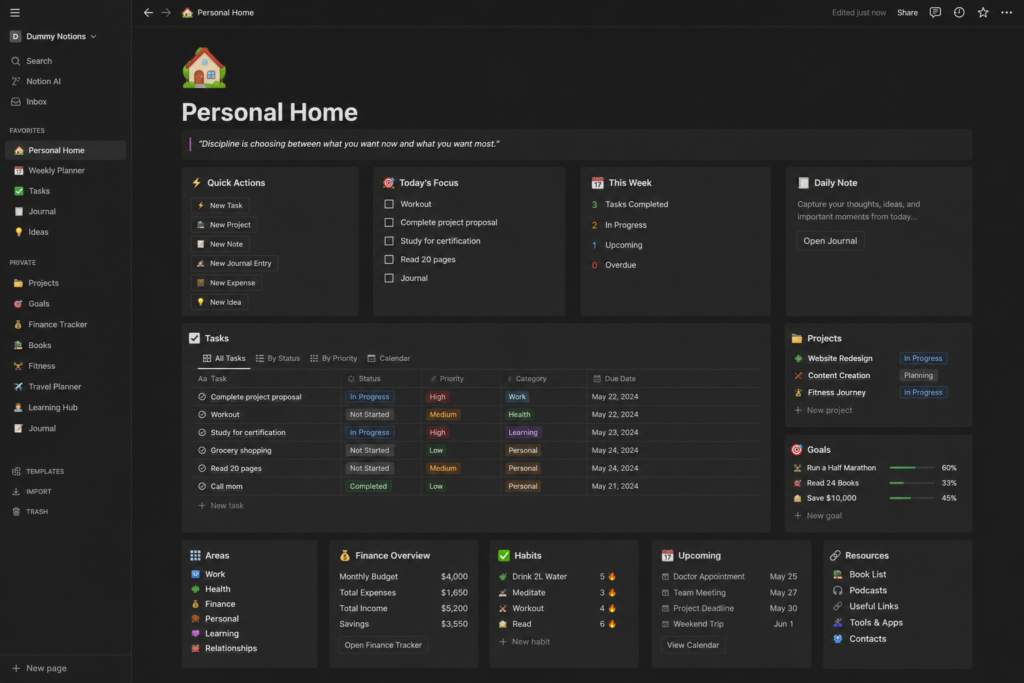
Notion is a powerful note taking app for students
- Google Calendar: Time Management App for Students
Mostly considered one of the most underrated time management apps for students, Google Calendar is a completely free application. The magic is in the color-coding. Once you’ve mapped your week, with each subject in a different color, you can see in seconds whether you’re overloaded on Wednesday or have breathing room on Friday. It also syncs seamlessly with Gmail and Google Meet, making it one of the most practical online learning tools for students in the entire ecosystem.
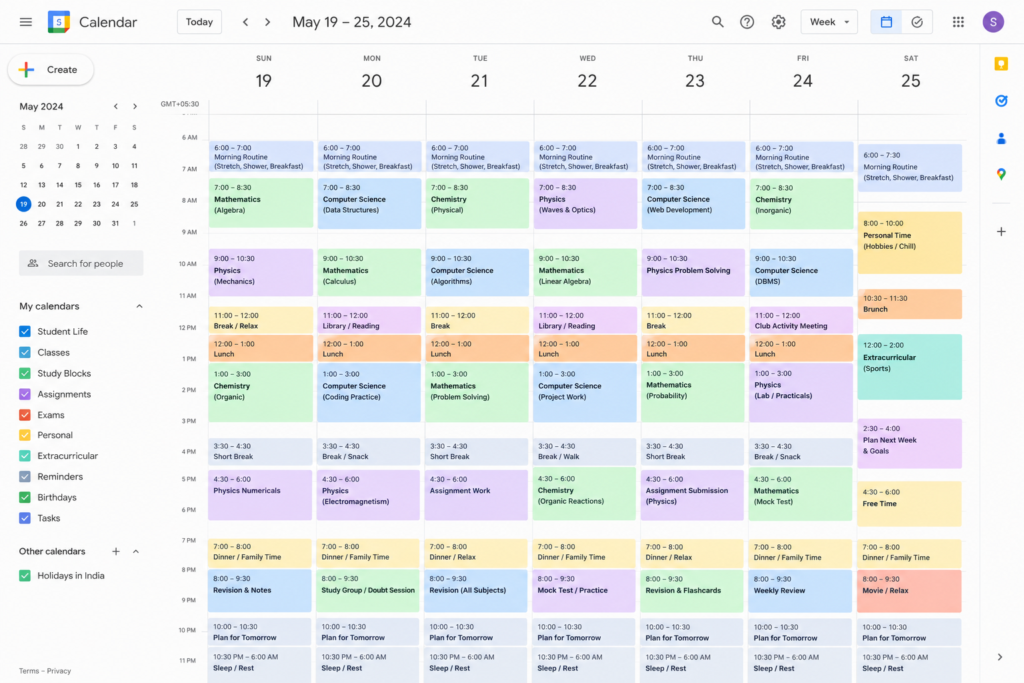
Google calendar is one of the underrated time management apps for students
Also read: How to balance online learning and personal/work life – Useful tips from MUJ’s online students
- Todoist: Study Planning App for Students
If you are still using sticky notes for your to-do list, then it is time to abandon it because those post its vanish even before lunch break. Then what’s next to keep yourself on toes to finish the assignment? Todoist it is! As one of the most reliable study planning apps available, Todoist tracks your daily completion of tasks, subtasks, priorities and so on. This provides a small psychological nudge that keeps procrastination at bay. Over time, it builds a picture of how productive your weeks actually are, which improve academic performance.
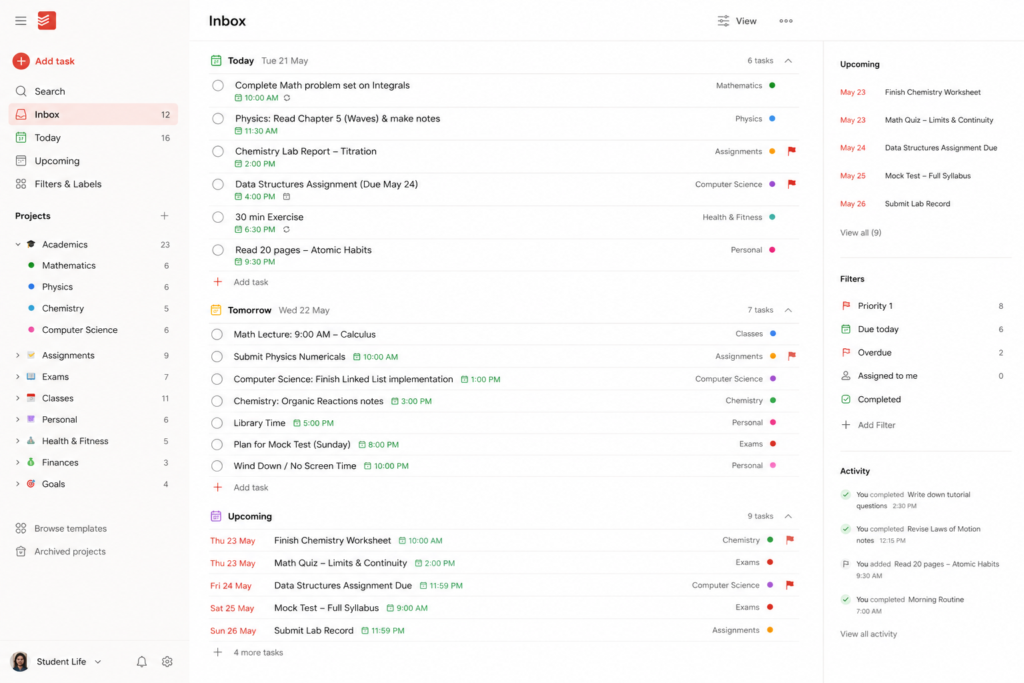
Todoist is a notable to-do list making tools preferred by many working professionals
- OneNote: Digital Note-Taking App
The best way to define Microsoft OneNote would be a notebook that never runs out of pages. It’s one of the most intuitive note-taking apps for students, organized into notebooks, sections, and pages that mirror how a real binder works, except you can search it instantly, attach files, draw diagrams, and record audio. For students who rely on a handwritten style of thinking, this is the best study app, bar none.
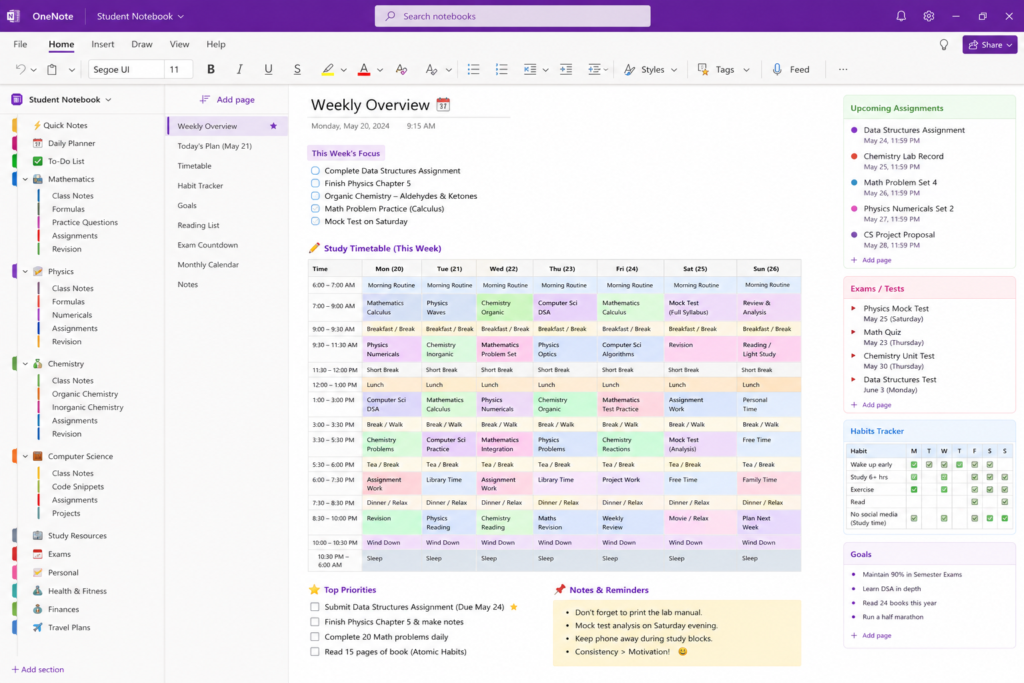
Microsoft OneNote is an intuitive note-taking apps for students
- Grammarly: Educational App for Students
Being one of the best educational apps for students, Grammarly has risen beyond just fixing typos. It carefully analyses the sentence structures, flags unclear phrasing, improves your vocabulary, and even adjusts suggestions based on your target tone. The premium version adds a plagiarism checker and AI detector, which is worth its weight in gold during essay season. Every student who writes academically, which is to say, every student should have it installed.
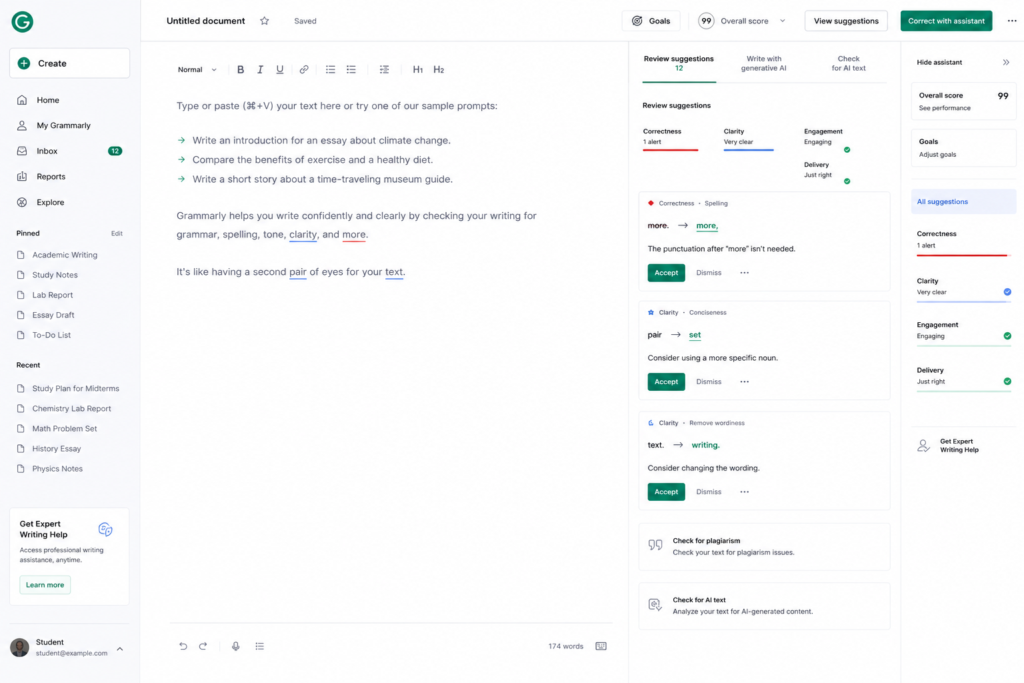
Grammarly is one of the best educational apps for students
An interesting read: How Meta-Learning in Online Education Helps Students Study Smarter
- Zotero: Research Tool for Students
If an unstructured essay that lacks formatting is your nemesis, then it is high time you start using Zotero. It comes with a free citation option that captures source details as you browse, such as from journal articles, websites, books, and even YouTube videos, and perfectly formats the references as per the user’s need. As one of the most essential digital tools for students doing research-heavy coursework, Zotero also stores PDFs, lets you annotate directly in the app, and syncs across devices.
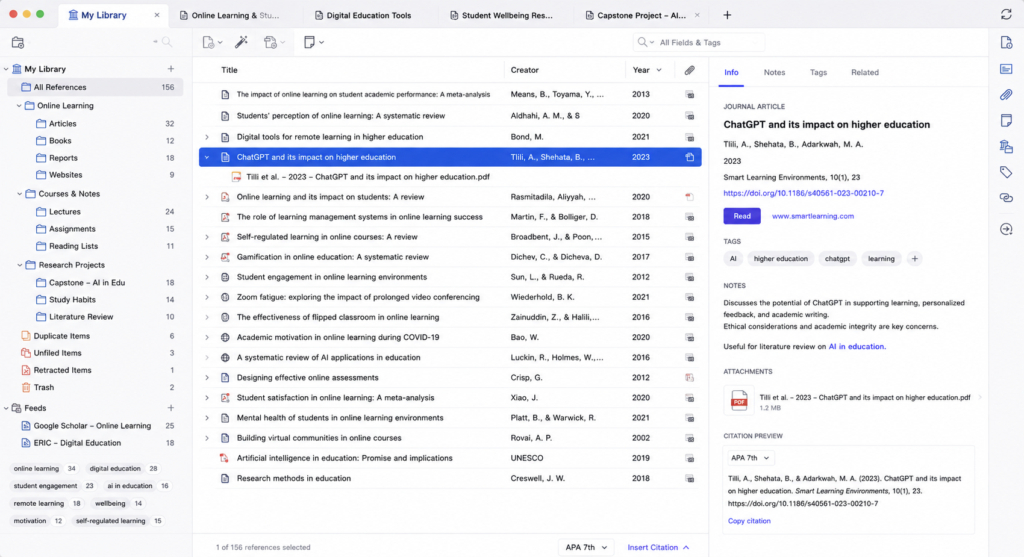
Zotero is one of the most essential digital tools for students doing research-heavy coursework
Must read: Tools & technologies software engineers should know
- Forest: Focus App for Studying
Built around Pomodoro-style focus intervals, Forest is one of the most beloved best productivity apps for students who struggle with phone addiction. Over time, you build an actual forest of focused hours, and the app even plants real trees through a charity partnership. Studying well has never felt more wholesome.
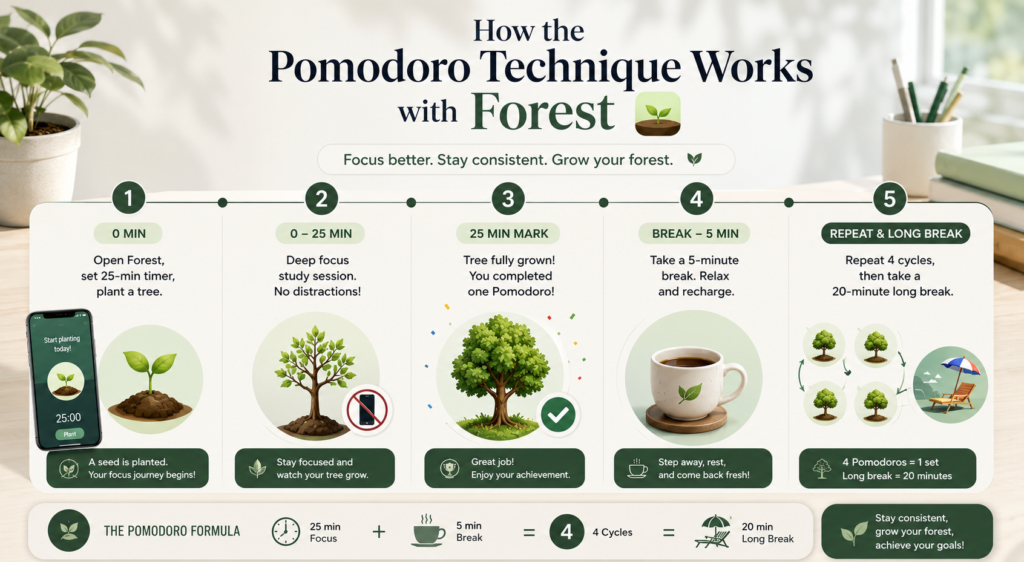
A pictorial representation of how Pomodoro techniqe can be made possible with the FOREST app
A good find: The Science of Attention: How to Stay Focused During Online Classes
- Google Drive – Your Academic Files, Everywhere, Always
There is a special kind of panic that comes from realizing your essay is saved only on your laptop, the one you left at home. Google Drive removes that risk permanently. As a cloud storage and collaboration platform, it is one of the most indispensable online learning tools for students, offering 15 GB of free storage that syncs instantly across all your devices. It works like a charm for group projects. Multiple learners can edit, leave comments, suggest ideas, or see others’ changes in real life in the document at the same time from any device, provided they are given permission by the owner. If you want friction-free collaboration, Google Drive is the student productivity tool that makes it effortless.
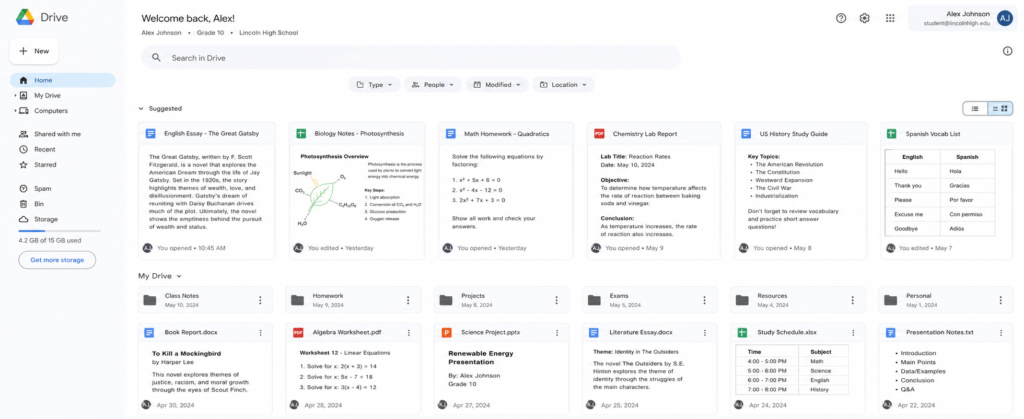
Google Drive is the student productivity tool that makes a learner’s life easy
- Trello: Project Management Tool for Students
Some people think in lists. Others think in visuals. Trello is for the visual thinkers. Its drag-and-drop card system lets you map out any project across columns such as To Do, In Progress, Under Review, Done, giving you an instant, satisfying overview of exactly where everything stands. Team members can be assigned specific cards, deadlines can be set on individual tasks, and files can be attached directly to the relevant card. It’s one of the most underused academic productivity tools for group work.
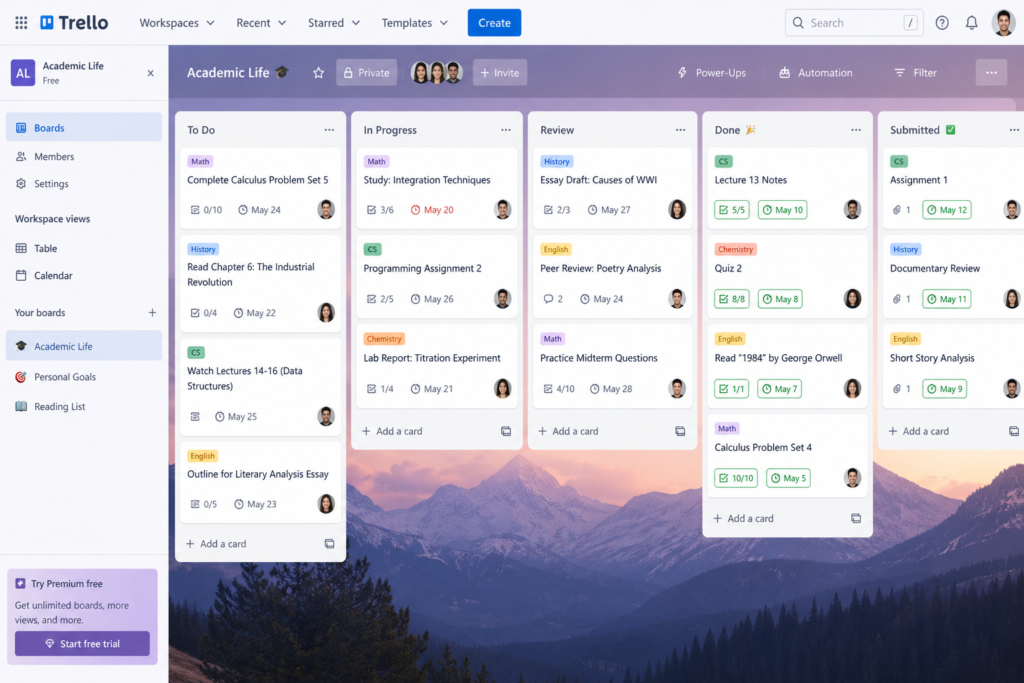
Trello is a tool for visual thinkers
Conclusion
Your degree is hard enough without fighting your own disorganization every step of the way. The right student productivity tools don’t make academic life easier by lowering the bar, but they raise your capacity to meet it. Whether you start with a simple calendar, a sharper note-taking system, or a focus timer that finally beats your phone habit, each tool is a small investment that pays out in grades, confidence, and career readiness.
You don’t need all nine tools from day one. Pick one that speaks to your biggest frustration right now, use it for two weeks, and then layer in the next. Learners who do best academically are not the ones with the most sophisticated setups; they are the ones who found a system that works and actually showed up for it every day.
Start today. Future-you will be grateful.
Frequently Asked Questions About Productivity Apps for Students
What are the best productivity apps for students?
The best productivity apps for students include Notion, Todoist, Google Calendar, Forest, and Microsoft OneNote. These tools help learners stay organized, manage deadlines, take notes, and improve focus throughout their academic journey.
Which note-taking apps for students are most effective?
Among the most effective note-taking apps for students are Notion and Microsoft OneNote. Both allow learners to organize lecture notes, create study materials, store files, and access information across multiple devices.
How do time management apps for students improve academic performance?
Time management apps for students, such as Google Calendar and Todoist, help learners plan their schedules, prioritize tasks, set reminders, and track deadlines. This reduces last-minute stress and improves productivity.
Are digital tools for students worth using?
Yes, digital tools for students can simplify note-taking, assignment tracking, research, collaboration, and time management. When used consistently, these tools can help learners stay focused and manage their academic responsibilities more efficiently.
What is the best focus app for studying?
Forest is one of the best focus apps for studying because it uses the Pomodoro Technique to encourage distraction-free study sessions. Students can stay productive by growing virtual trees while avoiding phone usage during focus periods.
Prepare for your next career milestone with us